AI at work
Getting real speed from AI: one process at a time, with a trained team
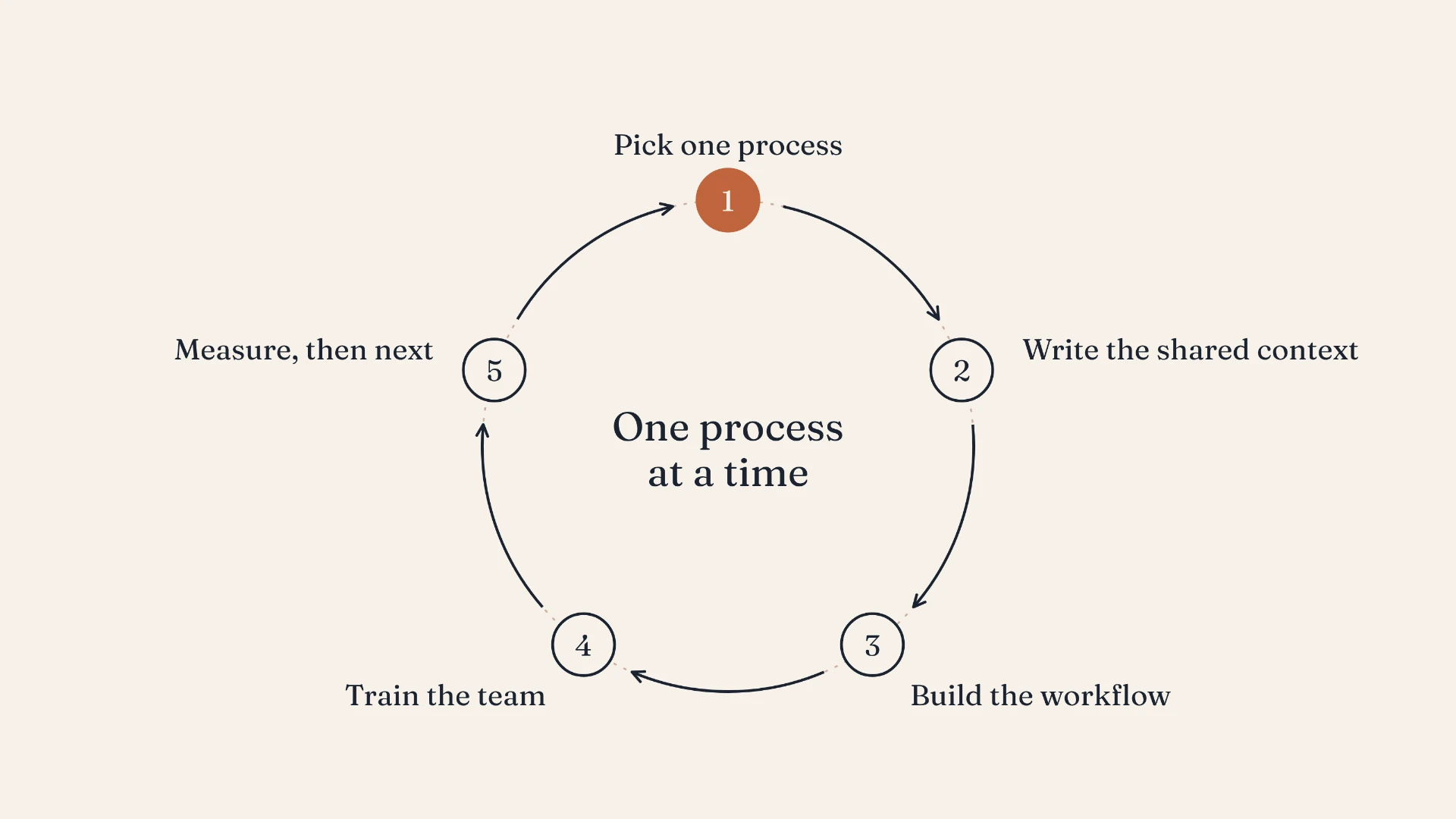
Pick the task that takes the most time, set up the workflow, train the team, measure the time saved, then move on.
Most marketing teams I talk to already use AI. Someone drafts LinkedIn posts with it. Someone else summarizes sales calls. The head of marketing has tried three tools and kept one.
And yet, ask what it has changed for the team and the answer is usually vague. People feel a bit faster. Nobody can point to a process that now takes half the time.
That's the gap between using AI and getting speed from it. Closing it takes a different approach from the one most teams start with.
Start with the work, not the tool
The usual starting point is a tool: a new platform, a subscription, a demo that looked impressive. Then the team goes looking for things to do with it.
Flip it around. Start with the work your team does every week, and find the task that costs the most time or frustrates people most. Account research before sales meetings. The weekly pipeline report. Turning one webinar into a month of content. Preparing campaign briefs.
Pick one. Not ten. One process where a clear improvement would matter to the team.
Write down what AI needs to know
AI output is only as good as the context it gets. If every person prompts from scratch, you get generic results, and every result sounds a little different.
Before building anything, write down the essentials once: who you sell to, how you position the product, how your brand sounds, what matters this quarter. Every workflow then works from the same foundation. It's the single step that does the most to turn generic AI copy into output that sounds like your company.
Build the workflow around how people already work
A good AI workflow fits into the team's existing routine. If sales prep happens in the CRM, the account research should land there. If the weekly report goes out on Monday, the draft should be ready on Monday morning.
Keep a person in the loop. AI drafts, a person reviews and decides. That's how quality stays high, and it's how people learn to trust the output.
Train the team on their own work
This is the step most rollouts skip, and it's why so many of them stall. A few enthusiasts use the new workflow. Everyone else carries on as before.
Training works best on real work. Not a generic demo, but a session where each person runs the new workflow on their own accounts, their own campaign, their own report, and leaves with something they'll use the next morning.
Start with a few champions: people who are curious and respected by their peers. They learn first, help refine the workflow, and become the people everyone else asks.
Measure, then move on
Before you start, note how long the process takes today. A month later, measure again. Hours saved, output per person, quality, and where you can see it, the effect on pipeline.
That number does two things. It tells you whether the workflow is worth keeping. And it makes the case for the next one, because nothing convinces a skeptical team like a colleague who got half a day back every week.
Then pick the next process, and do it again.
Why one at a time works
It can feel slow. It isn't. A team that improves one process a month, properly, is far ahead after six months of a team that bought four tools in January and is still figuring out what to do with them.
The simplest version that actually gets used beats the most sophisticated one that doesn't.